
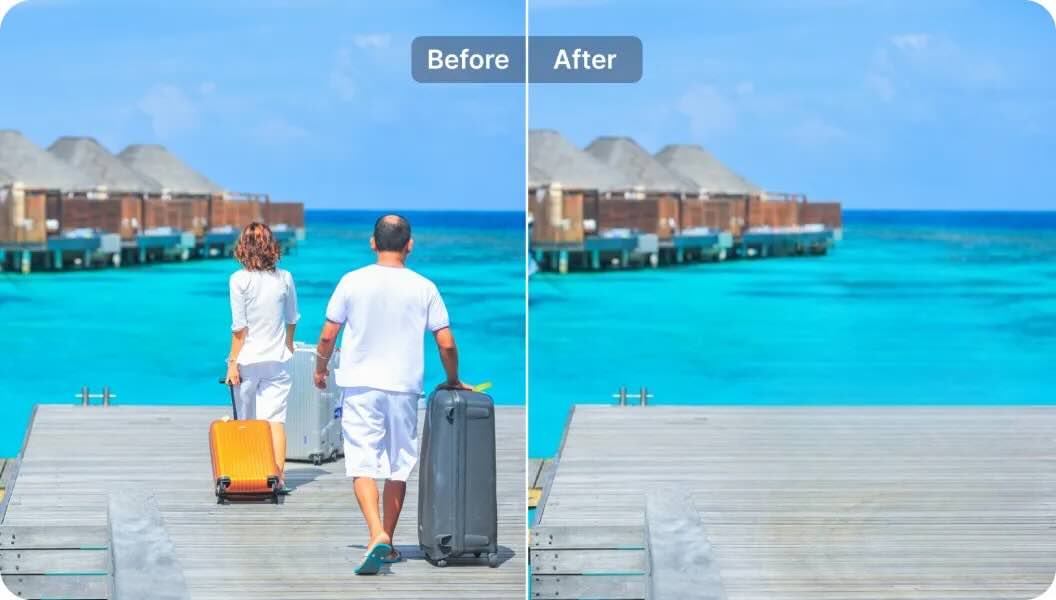
83: One Swipe to Make Strangers Disappear
Magic Eraser - AI Photo Editor
This app is a mobile-first AI photo editing suite that has quietly amassed one of the largest user bases in the object-removal category on the Play Store. With over half a million reviews and a near-perfect 4.7-star average, it sits in rarefied air for a freemium utility app. The app positions itself as an all-in-one solution spanning object removal, background erasure, photo enhancement, and generative AI features — a scope that extends well beyond its namesake tool .
What It Does Well
1. Accessible AI Power for Casual Users
The app's core strength is democratizing retouching workflows that previously required Photoshop expertise. The object removal tool uses a simple brush-select-and-erase interaction: users paint over unwanted elements, and the AI fills the gap with contextually appropriate texture . Undo/redo functionality and adjustable brush sizes provide enough precision for most casual editing scenarios without overwhelming non-technical users .
2. Generous Free Tier
Unlike many competitors that watermark free outputs or severely limit resolution, the free version of Magic Eraser delivers usable, watermark-free results at reasonable quality . This frictionless entry point likely explains the app's massive download volume and high review count — users can genuinely accomplish meaningful edits before hitting a paywall.
3. Feature Breadth Beyond Object Removal
The app has evolved from a single-purpose utility into a comprehensive editing suite. Background removal, photo enhancement, and background expansion tools are genuinely useful for e-commerce sellers, social media creators, and real estate photographers who need clean product shots or property images without hiring retouchers . The dehaze and unblur functions address common mobile photography flaws that object removal alone cannot fix .
4. Strong Market Validation
A 4.7-star rating across 515,000+ reviews is statistically significant and suggests consistent quality delivery. For context, many popular photo editing apps with comparable download counts struggle to maintain ratings above 4.3. This indicates the app successfully meets user expectations for speed, output quality, and reliability .
Limitations & Concerns
1. Feature Bloat vs. Core Competency**
The app markets itself as an "all-in-one photo editor," but this breadth introduces tension. AI image generation, logo design, and anime conversion feel tacked on to chase trending keywords rather than solving coherent user problems . These features compete with dedicated tools (Midjourney, Canva, Remini) that offer superior results. Users seeking a focused object-removal experience may find the expanded feature set distracting.
2. Aggressive Monetization Friction**
While the free tier is functional, premium features: particularly object replacement and high-resolution exports are gated behind subscription prompts that interrupt workflow . The app uses a common dark pattern: allowing users to initiate premium-feature actions before revealing the paywall, creating frustration. For power users who need batch processing or professional-grade output, the subscription cost may not justify the results compared to desktop alternatives
3. AI Inpainting Quality Ceiling**
On complex backgrounds — busy textures, repeating patterns, or scenes with strong perspective — the AI fill can produce visible artifacts, smearing, or obviously synthetic patches . This is a universal limitation of current mobile inpainting, but Magic Eraser does not consistently outperform free alternatives like Snapseed's Healing tool or Samsung's built-in Object Eraser in challenging scenarios. The "magic" works best on simple, uniform backgrounds.
4. Privacy Ambiguity**
The app requires storage and camera permissions, which is standard, but the developer (Creatix Technology Global Limited) lacks the brand recognition and transparent privacy posture of established players like Adobe or Google . Users uploading sensitive personal photos should be aware that cloud-based AI processing may occur for complex generative features, though the app does not make this explicit in its marketing.
5. Ad-Supported Free Experience**
The free version includes advertising, which can disrupt editing flow . While not unusual for freemium apps, the ad density and placement relative to editing controls can lead to accidental taps — a common complaint in user reviews of similar tools.
Competitive Positioning
Magic Eraser occupies a crowded segment. Its closest mobile competitors include:
- Google Photos Magic Eraser / Magic Editor (Pixel-exclusive or Google One subscription): Superior AI quality but platform-locked or paid
- TouchRetouch** ($3.99 one-time): Cleaner UI, no subscription, but fewer features and no generative AI
- Adobe Photoshop Express (Freemium): More powerful manual tools but steeper learning curve
- Remove.bg / Magic Studio (Web-first): Stronger background removal but requires desktop workflow
Magic Eraser's competitive advantage is its mobile-native, feature-stacked approach at zero upfront cost. It wins on accessibility and breadth, not on best-in-class output for any single task.
### Target Audience
Social media creators needing quick cleanup of tourist photobombers or distracting background elements
Small e-commerce sellers requiring basic product photo editing without design software investment
Casual photographers wanting one-tap enhancement and retouching on mobile
Real estate agents cleaning up property listing photos
It is not recommended for professional photographers, graphic designers, or users requiring pixel-perfect inpainting on complex compositions desktop tools remain superior for precision work.
Verdict
Magic Eraser: Remove Objects is a competent, well-reviewed utility that successfully lowers the barrier to AI photo retouching for mainstream mobile users. Its 4.7-star rating and 10M+ downloads reflect genuine utility, not artificial inflation. The free tier delivers real value, and the feature expansion into backgrounds, enhancement, and generative tools creates a sticky ecosystem for casual editors.
However, the app suffers from feature sprawl that dilutes its original identity. The premium subscription model feels aggressive relative to the output quality ceiling, and complex edits still reveal the limitations of mobile AI inpainting. It is an excellent "good enough" tool for quick fixes and social content, but professionals and perfectionists will eventually outgrow it.
**Rating:** 7.5/10 A polished, accessible mobile editing suite with a genuinely useful free tier. Recommended for casual users and content creators seeking fast, acceptable-quality retouching without learning curve or upfront investment. Power users should evaluate premium value carefully against desktop alternatives.